Playbook + practice template · Free to use
Category page SEO playbook
Build a category brief that connects search intent, a useful range and a verifiable publishing checklist.
Practice datasets are fictional and labeled as such. Real store captures are dated observations with their own sources and evidence limits.
Start with a shopping decision
Use this playbook when a category is difficult to discover, attracts the wrong visitors or fails to explain its range. The deliverable is a reviewed page brief, not a block of SEO copy added below the products. You need a catalog export, the current category page, customer questions and query evidence. A spreadsheet and browser are enough for the supplied exercise.
Choose one category with a stable purpose. “Women’s jeans” describes a department; “black wide-leg jeans” may describe a valuable narrower range or merely a temporary filter. Decide using the products you can maintain and evidence of the shopping task. Neither a large competitor nor a keyword tool can make that merchandising commitment for you.
Real store observation
H&M: a category organized around fit
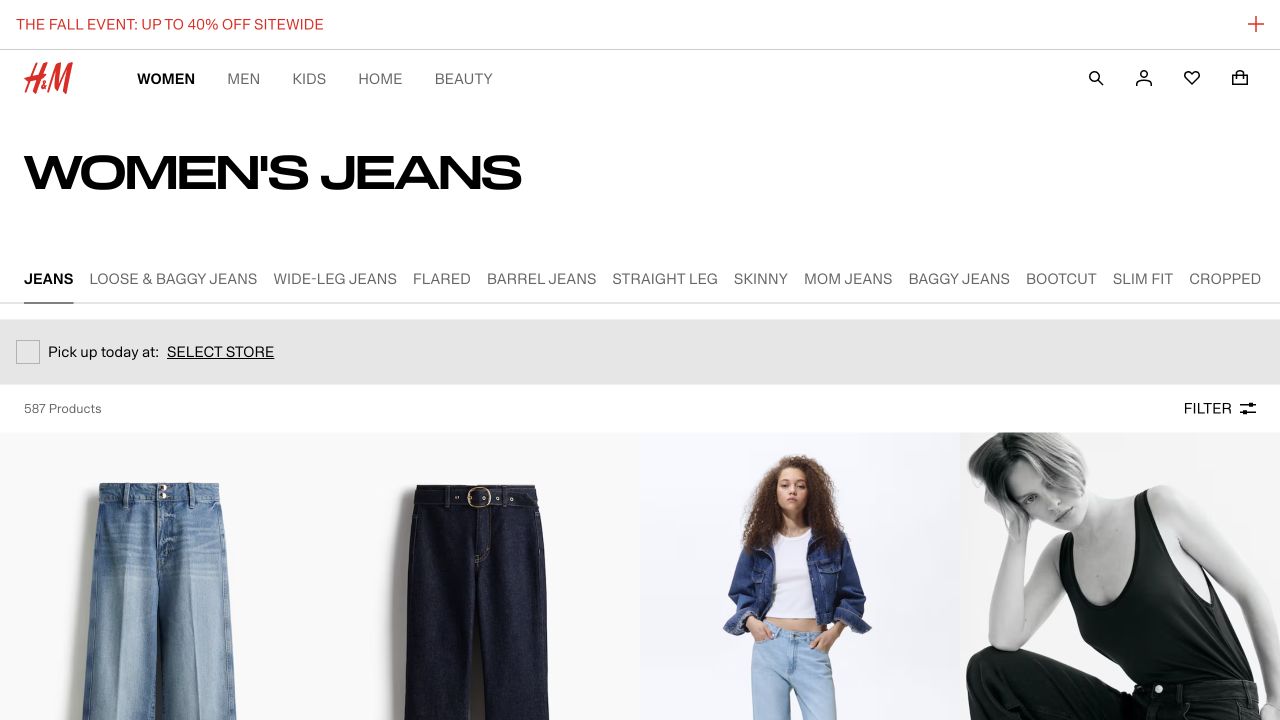
- The heading defines the broad range; links such as Wide-Leg and Straight leg provide narrower routes.
- The product count describes the captured state, not a permanent assortment size.
- Product photography, named styles and price information help distinguish choices inside the range.
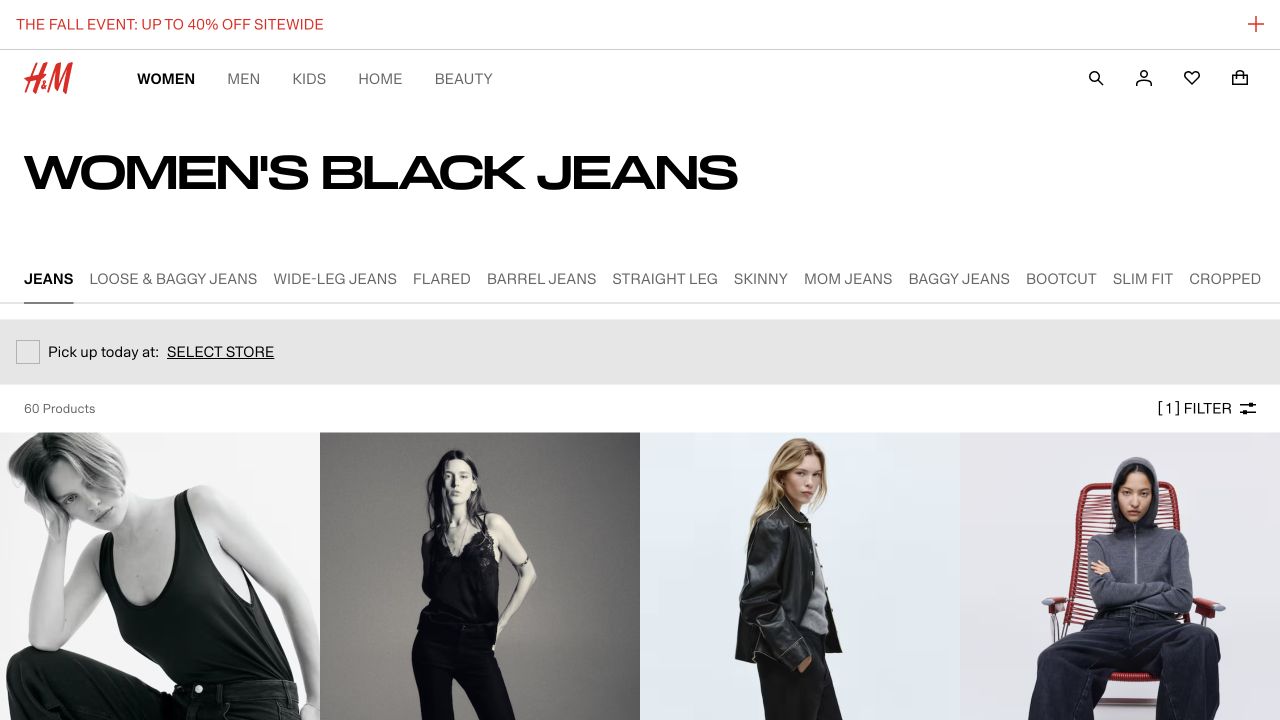
- The black-filter destination shows 60 products compared with 587 in the unfiltered observation.
- The active-filter indication helps explain why the assortment changed.
- A working filtered page does not establish that it should be independently indexed.
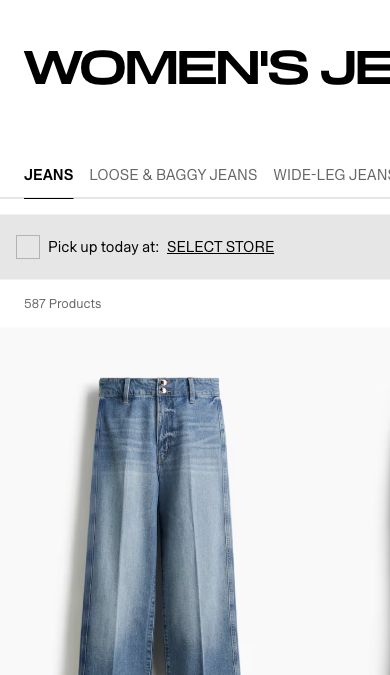
- Fit navigation remains above the range.
- Cards show the product name, price and color choices beneath the photographs.
- This mobile capture is separate from the desktop overview above.
Independent educational analysis of H&M’s public page. No client relationship or endorsement is implied.
Evidence limits. Counts and prices are historical observations. We did not establish H&M’s index policy or ranking performance. Applying a filter through the panel caused an application error in this session; the captured filtered destination was opened directly from a link exposed by the category.
Collect evidence before choosing a page
Export product IDs, fit, material, color, available sizes, price and stock. Count products that actually satisfy the proposed category, rather than every SKU or size. Ten variants of one model do not provide the same choice as ten distinct models. Record temporary gaps separately from a category that has no credible assortment.
Combine relevant Search Console queries with store-search terms and support questions. Record the source, date, country and confidence. A query absent from an export is not proven to have no demand. Inspect current search results to see whether shoppers are being served category pages, product pages or buying advice; use that observation to challenge your proposed destination.
| Evidence | Fictional denim store | Decision |
|---|---|---|
| Catalog | 12 wide-leg models; 7 in black | A black wide-leg range is possible |
| Customer question | Which inseam fits petite shoppers? | Provide measurements, not just “petite” |
| Existing destination | Two competing black-jeans collections | Choose an owner before creating a third page |
Decide whether the task deserves a category
Write the shopper’s decision before selecting a template. “Compare black wide-leg jeans in my inseam” requires a range and useful attributes. “How do I measure my inseam?” needs instructions. A new collection is not automatically the best answer to both. Keep a decision log containing the proposed task, existing destination, assortment owner and evidence still missing.
Review the range with merchandising before opening another URL. Count distinct models, then inspect size coverage: seven models available only in one uncommon size can overstate usable choice. Record seasonality and replenishment separately. There is no universal product-count threshold for a good category; the question is whether this particular range offers a credible, maintainable choice.
| Observed situation | Working decision | Evidence needed before publishing |
|---|---|---|
| Distinct shopping task; stable qualifying assortment | Improve the existing category, or brief one if none exists | Product-level inclusion rules and a named assortment owner |
| Same products and purpose as an existing collection | Use the existing destination | Compare both ranges and current internal links |
| A temporary combination such as size + discount + color | Offer a useful filter; decide search policy separately | Demand, durability and current crawl/index behavior |
| Question about choosing or measuring | Add focused help and connect it to the range | Verified measurement method and applicable products |
| No qualifying products and no replenishment commitment | Pause the proposed launch | A useful alternative or a credible supply plan |
Specify the range, then the explanation
Write one sentence describing who the page serves and which products qualify. Define exclusions: a straight-leg style does not belong just because its description mentions a wide hem. Assign an owner for automated collection rules and manual exceptions. This prevents the title promising a range the grid does not deliver.
Place essential selection help near the grid: the distinction between fits, a measurement link or the category’s scope. Put detailed care or comparison advice where it remains accessible without pushing every product far down the page. There is no universal minimum word count. Remove paragraphs that repeat the heading or could be pasted onto any category.
- Choose the existing URL that best owns the shopping task.
- Specify title, heading, qualifying products and exclusions.
- Write short decision support using verified attributes.
- List subcategories, buying guides and product destinations with descriptive link labels.
- Define behavior when the range shrinks or temporarily empties.
Worked brief: black wide-leg jeans
The fictional store keeps /jeans/black-wide-leg because the assortment includes seven distinct models, customer questions concern fit and inseam, and an existing category already serves the task. It retires the overlapping editorial draft rather than launching another competing listing. This is a practice decision, not a report of H&M’s strategy.
The brief requires a “Black wide-leg jeans” heading, seven qualifying models, waist-rise and inseam information on cards or accessible product details, a size-guide link and a route back to all jeans. Copy explains that wide leg describes the leg silhouette rather than the waist rise. The editor avoids “fits everyone” because no fit test supports it.
| Brief field | Completed example |
|---|---|
| Purpose | Choose black wide-leg jeans by waist rise and inseam |
| Exclude | Blue styles, straight-leg cuts, duplicate size cards |
| Helpful links | All jeans; size and inseam guide; high-rise range |
| Acceptance | Every listed model satisfies both color and fit; links and filters work on mobile |
Practice case: repair an unreliable linen collection
Fictional evidence pack. A collection titled “100% linen shirts” contains 14 distinct models because its rule matches the word “linen” anywhere in a product tag. The team has verified five models as 100% linen, five as a linen/cotton blend, and four as polyester with a “linen-look” tag. All 14 are currently purchasable. A support transcript asks whether “linen-look” means the shirt contains linen. No query export or supplier replenishment plan has been supplied.
Your assignment is to repair the current promise and draft an implementation ticket. Do not invent demand, stock longevity or a conversion forecast to justify the decision. Use the existing workbook to record a decision, evidence, owner and acceptance condition for each affected field. A missing commercial input is a follow-up, not permission to leave a false material claim live.
| Input | Supplied evidence | Consequence |
|---|---|---|
| Models L01–L05 | Supplier composition: 100% linen | Eligible for the current category promise |
| Models B01–B05 | Supplier composition: 55% linen, 45% cotton | Exclude from “100% linen”; suitable for an explicitly labeled blend range |
| Models P01–P04 | Supplier composition: 100% polyester | Exclude; “linen-look” is not material evidence |
| Collection rule | Tag contains linen | Replace the rule with verified composition criteria |
| Demand and future assortment | Not supplied | Leave the decision to launch an additional category open |
- Write the corrected inclusion rule and the IDs it should return.
- Draft a heading and two sentences of shopping help that the supplied evidence supports.
- Specify how to prevent duplicate cards for sizes of the same model.
- Define tests for one pure-linen model, one blend, one polyester model and one missing-composition record.
- Name the missing input that would change your decision about a separate blends category.
Worked solution and review criteria
Keep the current promise only with L01–L05 in the grid. Replace the loose tag rule with a verified composition field; route missing or ambiguous composition to review instead of silently including it. Retain excluded products in their accurate broader categories. This changes collection membership, not the continued existence of the product pages.
Example copy: “100% linen shirts. Compare five styles made from 100% linen. Check each product’s measurements and care instructions before choosing your size.” This deliberately avoids claims about softness, sustainability or shrinkage that the evidence pack does not establish. The number needs updating with the assortment; omit it if the CMS cannot keep it accurate.
The implementation ticket names merchandising as the composition owner and the collection developer as the rule owner. Acceptance: L01 appears once, B01 and P01 do not appear, and an unknown-composition fixture is flagged for review. Check the rendered grid on mobile and the rule’s complete result set, not just the first visible cards. Record the previous rule so it can be restored if the new rule breaks unrelated collections; do not restore inaccurate copy as the recovery plan.
A satisfactory submission distinguishes material evidence from tags, leaves the new category decision conditional, and includes observable pass/fail tests. “Add more SEO text” fails the exercise because it does not repair the mismatch. A different heading can be valid if it accurately describes every included product and the changed merchandising purpose is explicitly approved.
Handle empty ranges and pagination deliberately
If a seasonal range is temporarily empty, check the restock plan and whether the page still helps shoppers before changing index policy. If the range has permanently disappeared, review demand, links and possible successors. A blanket redirect to the homepage does not preserve the original shopping task.
Test a product that appears beyond the first batch of results. A working “load more” button is not by itself evidence of discoverable links or distinct paginated URLs. Record what a browser sees, then separately inspect the page output and response. Do not assume a competitor’s filter URLs are indexable simply because they load.
Check discovery beyond the first screen
Choose one known product from a later batch. Follow the shopper journey, then inspect the link and URL evidence separately. Google generally discovers URLs through anchor links; it does not normally click a “load more” button to reveal the next batch. A smooth visual interaction alone cannot close a discovery investigation.
For a paginated series, verify a distinct URL for each page, links between pages and a self-referencing canonical on each page rather than a blanket canonical to page one. Fragment changes such as #page2 do not provide distinct pagination URLs for Google. Test your actual implementation before prescribing a redesign: the interface may already expose crawlable pagination underneath its incremental loading.
Close the check with the starting category URL, the later-page URL, the product URL and the observed href and canonical values. If access is limited to screenshots, mark discovery unverified. After release, compare the same category and relevant query groups over a comparable period, annotating assortment, seasonality and promotions; a traffic change alone does not isolate the effect of the copy.
Publish with a compact acceptance record
Before publication, check the heading against the actual assortment, follow every supporting link, apply and remove two filters, reload a filtered URL and inspect the mobile page. Check canonical, index directives and sitemap membership separately with the intended policy beside the observed output.
After publication, compare the same page group and market over comparable periods. Look at query relevance and downstream product visits as well as clicks. Record stock changes and promotions that could explain movement. A new paragraph and a subsequent traffic increase do not establish causality.
Apply the method to your own assortment
Choose a live collection whose heading makes a testable promise about material, fit, compatibility or use. Sample the listed models against authoritative product specifications. Record confirmed matches, confirmed exceptions and unknowns separately; do not silently treat missing attributes as a match.
Hand another editor your inclusion rule and the same sample without your conclusions. Resolve disagreements before publishing. Keep the accepted brief, evidence sources, owning team and repeatable checks in the workbook. Revisit the rule when the catalog schema or assortment changes, not only when organic traffic moves.
Sources and maintenance
Check current platform documentation before implementation. Review these instructions when your platform, catalog behavior or source guidance changes.