Playbook + practice template · Free to use
Merchant Center & free listings playbook
Trace a product from its data source to Google Shopping and diagnose mismatches with evidence.
Practice datasets are fictional and labeled as such. Real store captures are dated observations with their own sources and evidence limits.
Follow one product all the way through
This workflow is for an offer that is missing, rejected or inconsistent across your feed, landing page and Google results. Bring authorized access to your Merchant Center account, a product export, the actual landing URL and the inventory source. Public screenshots explain the shopping experience; they do not reveal a retailer’s Merchant Center configuration.
Choose one item ID, one country and one language. Record the data source and last processing time before making changes. An account-level policy problem, a missing item and a stale price are different incidents. Start with the status and affected scope instead of rewriting every product title.
Real store observation
Google Shopping: from search result to the exact offer
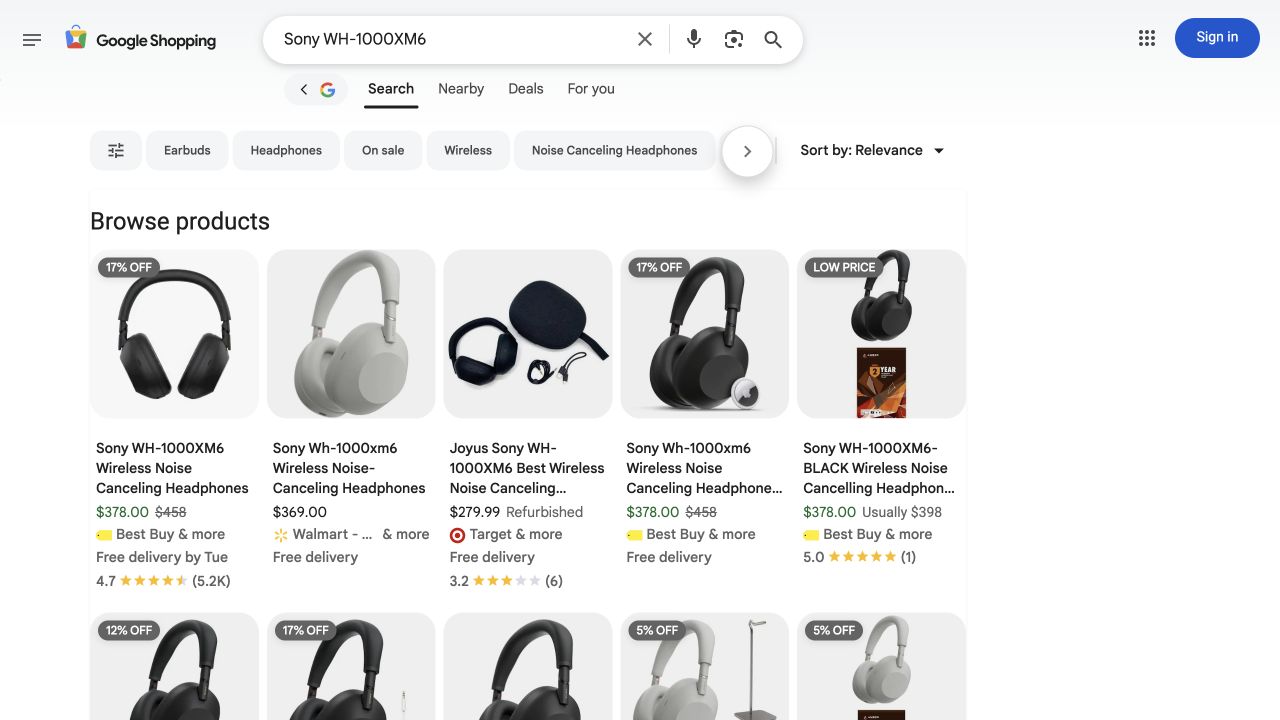
- The query is visible so the result can be interpreted in context.
- Some cards represent refurbished offers or bundles; prices are not automatically equivalent.
- No Sponsored label was visible in this captured area. This is not an audit of every placement on the page.
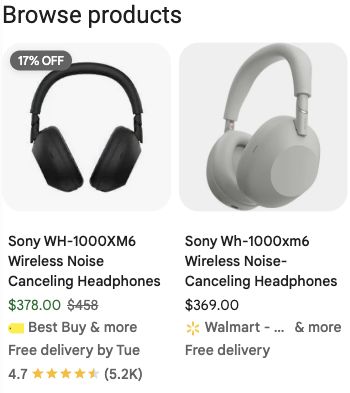
- Title, seller and price identify the offer the shopper is about to investigate.
- Delivery claims depend on context and time; they must be checked again at the retailer.
- The title is only one part of the offer. Rewriting it cannot repair a wrong landing variant.
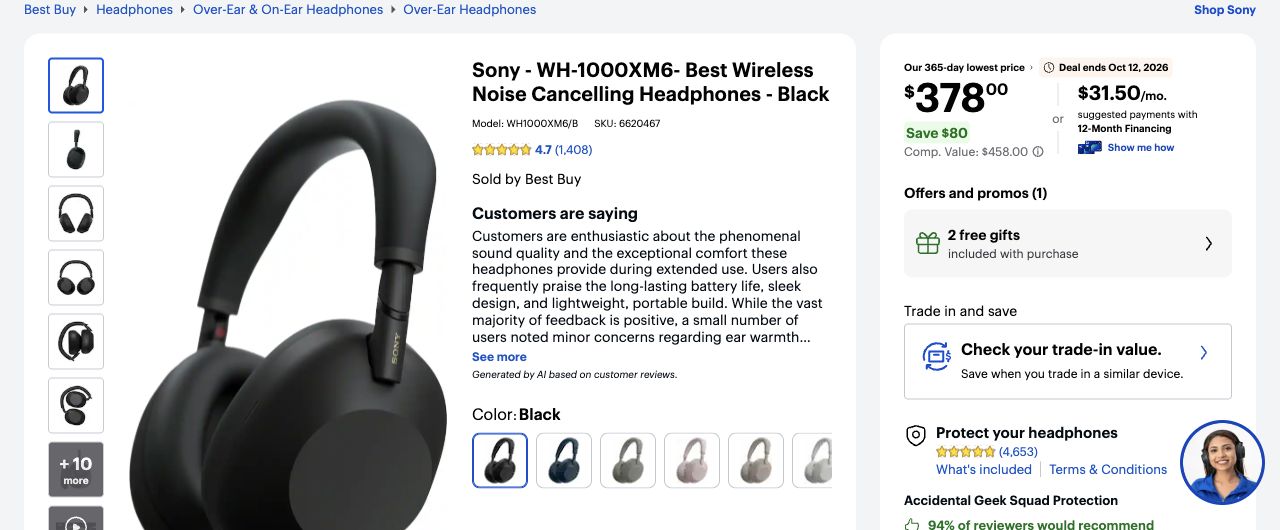
- The link landed on the black WH-1000XM6 with model WH1000XM6/B and SKU 6620467.
- The observed Shopping price and retailer offer were $378 in this session.
- Compare condition, selected color and delivery again; a matching model name is not the whole verification.
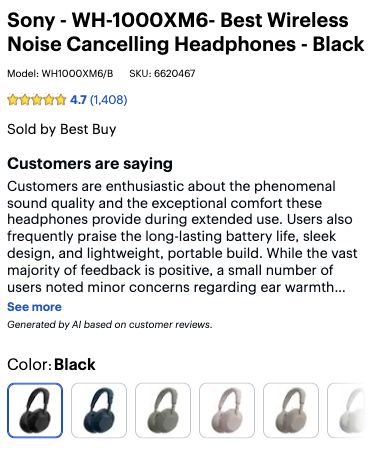
- Model and SKU are visible together.
- Black is the selected color.
- The seller is Best Buy; the AI review summary is not manufacturer specification evidence.
Independent educational analysis of Google Shopping / Best Buy’s public page. No client relationship or endorsement is implied.
Evidence limits. Signed-out session with gl=us and hl=en; precise location unknown. Results change by time, location and context. No private Merchant Center data, paid campaign settings or conversion performance was accessed.
Identify the scope before editing product data
Begin with one item ID, target country, language, destination and observation time. Save the exact issue wording and the account or item view in which it appears. A store-wide configuration issue, a rejected item and an eligible item that you cannot find in a search result are different investigations. Do not repair all three by rewriting a title.
Use the Google Shopping capture as a public observation exercise: identify the displayed product, seller and price, then compare the destination identity. It cannot reveal the seller’s Merchant Center account, processing history or eligibility. Likewise, the absence of your item from one query is not proof of a disapproval. Free-listing eligibility does not guarantee an appearance for a particular shopper or search.
| What you have observed | Investigate first | What not to conclude |
|---|---|---|
| Issue applies to the account or destination | Exact account notice, applicable setup and policy requirements | That changing one product title resolves it |
| One item has a reported data issue | The reported attribute across source, processed item and landing page | That the whole catalog shares the same cause |
| Recent source change is absent from processed data | Submission method, processing status and timestamps | That another page edit is immediately necessary |
| Item is eligible but absent from one search | Performance evidence and repeated comparable observations | That eligibility promises placement or traffic |
Build an offer reconciliation record
Compare the same item across catalog, submitted data, processed item details and landing page. Include variant, price, currency, availability, image and destination. Record timestamps so an inventory change between observations is not mistaken for a permanent integration defect.
A submitted file is not proof that Google has processed its latest version. Check the item’s current status and issue details in your account. Read the linked issue documentation and preserve the exact message. Do not substitute a generic SEO score for a product-specific diagnosis.
| Surface | Fictional observation | Interpretation |
|---|---|---|
| Catalog at 09:00 | 89 USD; in stock | Source of truth for this test |
| Submitted file at 09:10 | 89 USD; in_stock | Export matches |
| Processed item at 08:00 | 99 USD | Older processing state; investigate timing |
| Landing page at 09:15 | 99 USD | Page/cache also needs investigation |
Build a timestamped evidence record
Create one row per observation rather than overwriting the previous value. Include the item ID, market, currency, system, observed value and timestamp with timezone. Distinguish when the source was generated from when you inspected it. A downloaded file from yesterday cannot establish what was submitted this morning, even if its filename is unchanged.
Record which integration owns each field. A catalog export, an app mapping or an additional data source can supply different values; document the actual setup rather than assuming the visible catalog field is the final submitted value. Preserve a small affected sample and one unaffected control item. This makes it possible to tell a targeted fix from a broad mapping regression.
For the earlier 89/99 example, the 08:00 processed value predates the 09:10 submission. That is evidence of different observation times, not yet proof that processing rejected the new value. The 09:15 landing page is also 99, so a successful feed refresh alone could still leave a mismatch. Assign the page owner and feed owner separate checks and reconcile both after the next confirmed processing event.
- Record the exact issue, item, market and affected destination.
- Export or copy the relevant submitted fields without customer or account secrets.
- Record the processed values and their available status/timing evidence.
- Open the submitted link in a fresh session and record selected variant, currency, price and availability.
- On your own store, verify the same item through the cart and applicable purchase conditions without placing an order.
- Mark any unavailable layer as unverified and identify its owner before proposing a change.
Repair the source of the mismatch
Find which system owns each field. Prices may originate in the commerce platform while titles come from a supplemental source or feed transformation. Fixing a generated CSV by hand will not last if the next scheduled export overwrites it. Record the transformation, owner and reproduction steps.
For a landing mismatch, open the precise submitted URL without a stored shopping session. Check variant selection, currency, shipping destination and purchasability. Then inspect visible offer data and markup. If only one cached region is stale, document the region and cache behavior rather than replacing correct global data.
- Read the item and account issues, identifying their scope.
- Compare the six offer fields across source, processed record and page.
- Repair the owning system or mapping.
- Regenerate and submit through the existing authorized workflow.
- Confirm processing and recheck the landing page before marking the issue resolved.
Read the result as a shopper
Search results can include new, refurbished and bundled products for a similar query. In the captured Shopping example, the same model name appears with different sellers and conditions. Compare the actual offer, not just the largest price. A low price for a refurbished item is not evidence that a new item is overpriced.
Identify sponsored labels when present. The captured results are one session, not a stable ranking or proof that a particular feed generated a listing. Country parameters and English labels do not remove all location or personalization effects. Record these limits alongside the query and capture.
Worked incident: a sale price persists on one surface
A fictional sale ends Sunday at midnight. The page returns to 99 USD, but the export still sends 79 USD because its sale-price mapping ignores the end date. The repair belongs in the export logic and promotion schedule. Rewriting the description or requesting indexing does not repair the stale offer.
The closure record contains the corrected source row, processed item timestamp, current page evidence and a repeat check after the next scheduled export. If the next run reintroduces 79 USD, the fix is not complete. Keep the incident open with an owner rather than calling the initial submission a success.
Practice incident: an expired sale returns in the next export
Fictional exercise, all times UTC. Item JKT-B-M is a blue medium jacket sold in the US in USD. Its normal price is 99 and its sale price was 79 through Sunday 23:59. On Monday the page and cart show 99. The 08:00 export still contains sale_price 79 and no sale_price_effective_date. A teammate removes 79 manually at 08:30, but the next scheduled export restores it at 09:00. The exercise supplies no account-wide suspension or review request.
Write a repair proposal that names the owning system, the recurring cause to investigate, the smallest correction and the evidence required to close. Do not label the manual correction a permanent solution. Do not request an account review just because the page and submitted offer disagree; first resolve the actual issue and follow any instructions shown for that item.
| Time | Supplied evidence | Interpretation |
|---|---|---|
| Sunday 23:59 | Sale ends in the catalog schedule | Normal price should apply afterward |
| Monday 08:00 | Export: price 99, sale_price 79; no sale date | Submission still carries the expired sale |
| Monday 08:15 | Landing page and cart: 99 | Customer-facing offer no longer matches the stale sale |
| Monday 08:30 | Manual removal of the sale value | Temporary intervention; automation has not been repaired |
| Monday 09:00 | Scheduled export restores sale_price 79 | Recurring source or mapping behavior needs correction |
Worked solution: fix the source and prove it stays fixed
Inspect the export’s sale scheduling logic and the mapping that emits the sale attribute. Confirm the timezone used to evaluate the end time. The proposed fix is to stop emitting the expired sale and correctly handle sale periods in future exports. The provided evidence identifies a recurring export problem; it does not establish which line of code is responsible.
Before releasing, test the expired jacket, a currently active sale and a product with no sale. The expired item should submit the normal 99 offer, the active sale should retain its correct sale fields and schedule, and the non-sale item should remain unchanged. Check the generated submission rather than only the admin form. Then confirm the processed item reflects the intended values and revisit the exact landing URL and cart.
Wait for a subsequent scheduled export to verify the stale 79 does not return. Keep the before/after rows, generation times, observed processing status and page evidence. An issue notice may not disappear at the same instant as a source correction; record that state honestly and use the account’s current issue instructions if action is still required. Do not repeatedly toggle unrelated fields to force a different outcome.
A complete submission explains the recurring cause, includes the active-sale control and sets a closure condition across submission, processing and purchase path. “Change the page to 79” is not supported because the supplied sale has ended. “Remove every sale price” is also wrong because it would break the valid active-sale fixture. If the store intentionally extends the sale, obtain that commercial decision and update all affected systems consistently.
Practice, acceptance and ongoing checks
Practice: a blue shoe’s feed links to the red variant, the title says blue and the image is red. Write the smallest repair and a verification sequence. Worked answer: verify the item identity, correct the variant landing URL and image mapping, regenerate the row, confirm processing and inspect the selected landing state. Do not change the product ID merely to make the warning disappear.
Pass when the same item, market and timestamped offer can be reconciled across the systems you control. Eligibility and appearance remain separate outcomes. Review a sample after catalog imports, price changes and feed-rule updates, and widen inspection if the sample reveals a systemic mapping error.
Hand off a reproducible incident, not a screenshot alone
Use the workbook to retain the item/market, issue wording, timeline, field owner, proposed correction and acceptance evidence. Add a short impact statement bounded by the affected sample: for example, “three inspected jackets carry expired sale prices,” rather than “the entire feed is broken” unless you have tested that population.
Use the product feed checker for supported file-level checks before submitting a corrected export. Its output cannot confirm account eligibility, processed values or the contents of a live landing page. Keep those checks in the incident record. After resolution, monitor the affected item set and comparable destination reporting; do not attribute an immediate traffic increase to the repair without accounting for promotions, seasonality and other changes.
Sources and maintenance
Check current platform documentation before implementation. Review these instructions when your platform, catalog behavior or source guidance changes.