Platform guide + checklist · Free to use
WooCommerce SEO implementation guide
Diagnose product, taxonomy, plugin and cache behavior without relying on a universal SEO plugin setting.
Practice datasets are fictional and labeled as such. Real store captures are dated observations with their own sources and evidence limits.
Record the WordPress stack before changing it
List WordPress and WooCommerce versions, active theme, SEO plugin, filter extension, caching layers and feed integration. Record which component owns redirects, canonical tags, schema and sitemaps. This matters because two stores with WooCommerce can produce very different public pages.
Use staging with access protection and a recoverable configuration snapshot. Choose a simple product, a variable product, an out-of-stock variation, a category and a paginated category URL. The goal is a verified change set, not a checklist of plugins to install. Do not restore an old commerce database to recover a template change after new orders have arrived.
The project: trace one variation from attributes to the shopper
Use a protected staging store with a recoverable configuration and no live customer data. The fictional Alder shirt is one variable parent with three sellable combinations: blue/small at USD 29 with five units, blue/medium at 29 with zero units and no backorders, and red/small at 35 with four units. Give each variation a distinct SKU and record its actual generated variation ID separately. SKUs in this guide are practice labels, not database IDs.
The supplied incident starts with an administrator seeing blue/medium at 29 while an anonymous visitor sees 35. A second check asks whether the feed’s color can remain wrong despite a correct global mapping. These are investigation exercises: the inputs do not establish which cache or plugin is responsible. Your deliverable is a bounded change, a reproducible verification record and a recovery path that preserves commerce data.
Record the WordPress, WooCommerce, theme, filtering and feed versions before following the controls below. Extensions can replace editors and selectors. Use the documented equivalent in your stack and write down deviations instead of inventing a universal switch. Keep payments, outbound customer email and live feed synchronization outside the fixture exercise.
| Sellable fixture | Price and inventory | Expected selected state |
|---|---|---|
| AL-B-S | 29 USD; five units | Blue / small; purchasable |
| AL-B-M | 29 USD; zero units; no backorders | Blue / medium; unavailable or deliberately hidden by documented policy |
| AL-R-S | 35 USD; four units | Red / small; purchasable |
| Blue / large | Combination does not exist | No invented offer or silent substitute |
1. Permalinks and redirect ownership
Inspect WordPress Settings, Permalinks and the current product permalink configuration before changing a base or taxonomy path. Export affected URLs and decide their final destinations. A permalink change can affect many products at once; approving one example is not approval of the entire generated map.
Use the redirect mechanism already owned by your stack, whether server configuration or a maintained plugin. Avoid defining competing rules in multiple layers. Test an old URL through the complete delivery path, including caches, and inspect the final canonical. Case, trailing slashes and query strings require observed behavior rather than assumptions.
- Record the active permalink and redirect configuration.
- Inventory affected product and category URLs.
- Review a mapping with product IDs and purpose.
- Test representative redirects in staging.
- Deploy the reviewed rule set and verify live final destinations.
2. Taxonomies, filters and product discovery
Inspect Products, Categories and product attributes separately. Categories describe maintained groupings; attributes supply product characteristics that may also power filters. Review the filter extension’s output instead of assuming every attribute archive should become an indexed landing page.
Open a category, apply two filters, reload and remove one. Follow the resulting links and record URLs, count changes and the empty-result state. Check that the chosen canonical and index policy are actually emitted by the theme and SEO plugin. Test pagination with products beyond the initial grid.
Set up attributes that can support filters and feed mapping
Start in Products > Attributes to inspect the shared Color and Size taxonomies. On the variable product, select the relevant attributes and values in Product data > Attributes, then inspect the variations that use them. Categories define the maintained range; a color attribute defines a characteristic. Creating an attribute does not itself create a useful, maintained landing page for every term.
For this exercise, keep blue and red as distinct color values and small and medium as distinct sizes. Verify the three intended combinations rather than generating every possible combination and accidentally offering red medium. An existing catalog may use product-specific attributes; do not convert it blindly. Inventory the affected variations and test mappings before changing an attribute’s ownership.
Configure the store’s existing filter block or extension to use the intended taxonomy. Record that component by name and version, then test a category with blue, medium and availability selections. Confirm how its product-level filtering relates to variation-level availability. A count change is not enough: follow the product and inspect the selected combination, including the empty-result path.
- Record the current category, attribute taxonomy and term slugs.
- Confirm which attributes define the three fixture variations.
- Check the active filter component’s source and display configuration.
- Apply one filter, combine two, reload, then remove one.
- Inspect the actual product/variation returned and the nonexistent blue/large case.
- Review canonical and index directives separately from whether the filter works.
3. Product and variation settings
For a variable product, inspect attributes used for variations, the generated variations and inventory settings. Record whether stock is managed for the parent, individual variations or a combination supported by the configuration. Catalog visibility and purchasability are different controls; a hidden product and an unavailable variation should not be diagnosed as the same issue.
Open the public page for an in-stock and unavailable combination. Confirm that price and stock messaging update together and that direct entry preserves the intended choice. If an extension hides out-of-stock products, check the effect on category discovery and support information before enabling it across the catalog.
| Layer | Question |
|---|---|
| Parent product | Is the shared description and product identity correct? |
| Variation | Are attributes, price and stock correct for this sellable item? |
| Catalog visibility | Can the intended audience discover the product? |
| Theme | Does the selected state show the correct offer? |
Verify prices, backorders and missing combinations
In the product’s Product data > Variations panel, expand each fixture and check its selected attributes, enabled state, price and inventory policy. WooCommerce requires a price for a variation to appear. Record whether inventory is managed on the parent or on each variation; do not assume a parent-level stock number describes all combinations independently.
Check the store’s hide-out-of-stock policy as well as variation-level inventory and backorders. Depending on that configuration, an unavailable combination may be hidden or displayed with an unavailable message. Write the intended behavior before testing it. The important result for AL-B-M is that it cannot be ordered under this exercise’s no-backorder policy and is not silently replaced by a different SKU.
Use the actual links produced by your storefront or integration for direct-entry tests. Record attribute parameter names and values rather than assuming every theme uses the same link format. Verify the selected item, reload it and then switch to AL-R-S. In your controlled store, inspect the cart for both available fixtures without completing checkout. Test the nonexistent blue/large combination as a negative case.
Real lab walkthrough: correcting an unintended backorder
We ran the stock-policy test in WordPress Playground with an actual WooCommerce installation. Blue medium was deliberately configured with zero stock and backorders allowed, then corrected through the variation editor. The five frames show the configuration, its storefront effect, the saved correction and an available control. This observed exercise is separate from the hypothetical stale-price investigation below.
Real software · controlled practice lab
WooCommerce lab: zero stock and an unintended backorder policy
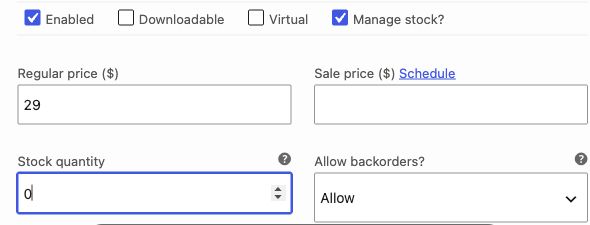
- Variation 13 is AL-B-M, blue / medium. Inventory management is enabled and quantity is zero.
- Allow backorders is set to Allow, contrary to this exercise’s no-backorder requirement. Zero stock alone does not block orders.
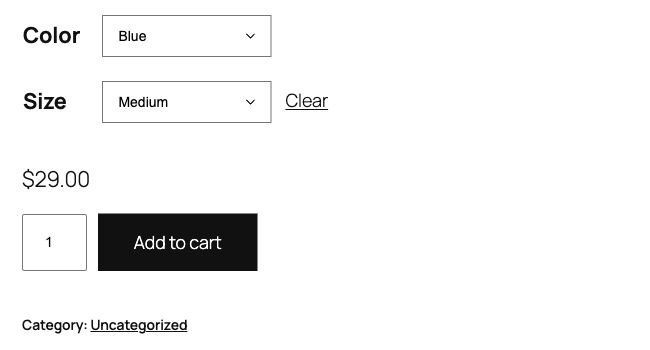
- The directly opened variant URL preserves Blue / Medium and shows 29 USD.
- This captures the interface state before the correction. No order was placed.
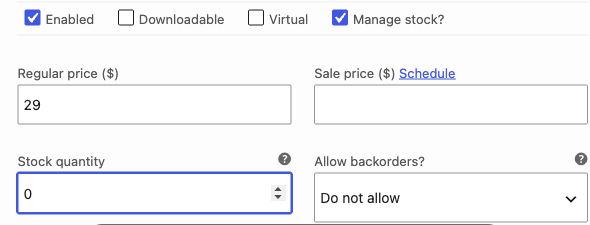
- Changed only the backorder setting and used Save changes.
- Reopened the variation after saving to confirm the setting persisted; the price and quantity are unchanged.
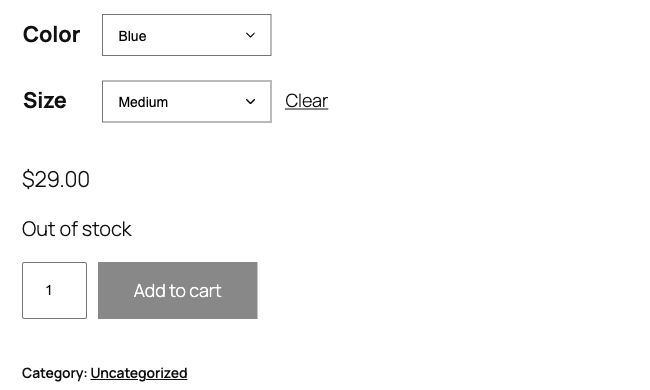
- Reopened the same direct-entry URL after saving. Blue / Medium stays selected.
- The page now reports Out of stock and the buying control is visually inactive.
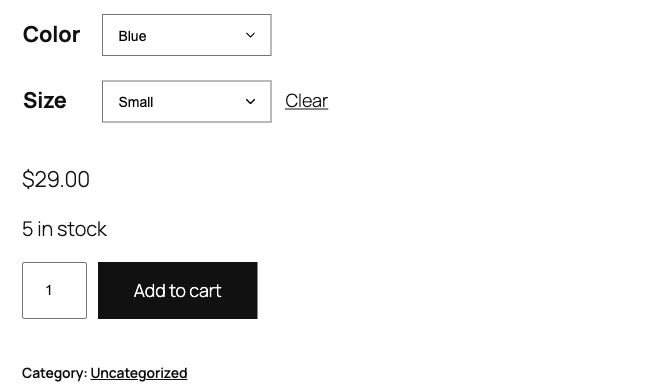
- Changed only Size to Small: the page reports 5 in stock at 29 USD.
- The control shows that correcting medium did not make every variation appear unavailable.
Captured in our controlled practice environment using WordPress Playground. Products and inventory are fictional; the software interface is real.
Evidence limits. Captured on 2026-10-10 in a WordPress Playground browser lab, in the administrator’s storefront preview. The lab entered Coming soon mode during setup. Anonymous access, checkout enforcement, payments, cache behavior and Merchant Center synchronization were not tested. The separate 29/35 cache and Google mapping exercises remain hypothetical.
4. Markup and feed integrations
Inspect the markup WooCommerce, the theme and plugins actually emit. Do not assume the platform provides no product structured data, and do not install a second generator before checking existing output. Compare product identity, currency, price and availability with the visible selected offer.
Export a small feed sample and join it to products or variations by stable IDs. Check the integration’s mapping for parent IDs, variation links and images. After repairing a mapping, generate a fresh export and inspect the processed channel record. A change inside a plugin screen is not evidence that the external record has updated.
Diagnose a Google mapping that appears to be ignored
This example applies specifically to Google for WooCommerce, not every feed extension. Its Attributes controls are under Marketing > Google for WooCommerce. It can map supported global product attributes into Google fields. Product-specific custom attributes are not interchangeable with the supported global attributes in that mapping interface, and an individual product’s Google field can override the global rule.
Fictional evidence: the shared Color attribute says blue; the category rule maps Color from that attribute; the product’s Google tab explicitly says red; the latest submitted record still says red. Investigate the product override first. The supplied evidence supports correcting an unintended override or its ownership; it does not support adding another global rule that still loses precedence.
Save the current product field and global mapping. Correct the unintended override, regenerate or synchronize through the existing integration and inspect the actual affected item. Test a red control product to ensure the repair did not force the whole category to blue. Inspect Merchant Center’s processed record only on an authorized connected store; otherwise keep that verification row open.
| Layer | Fictional before value | Expected after correction |
|---|---|---|
| Shared product Color | Blue | Blue; unchanged |
| Category mapping | Use shared Color | Same intended mapping |
| Individual Google field | Red override | Corrected according to the approved field ownership |
| Fresh submitted item | Red | Blue for the affected item; red control unchanged |
| Processed Merchant Center item | Not supplied | Verify after processing; do not infer from the plugin screen |
5. Caching, images and mobile verification
Record the cache layer and the pages it affects. A logged-in administrator may see fresh data while an anonymous shopper receives an old price. Test anonymously and note when each layer was refreshed. Keep checkout, cart and personalized behavior under the store’s existing safe caching policy.
Measure representative mobile product and category pages. Separate field data from lab diagnostics and record image weight, layout shifts and third-party work where relevant. Reproduce a problem in staging before disabling plugins. Change one suspected cause and verify filters, variants and purchase controls after the performance check.
6. Worked incident: a stale variation price
The fictional admin shows a blue medium shirt at 29 USD, while an anonymous visit shows 35 USD. The first hypothesis is a stale rendered page or variation response, not an incorrect title. The operator records both states and inspects the plugin and cache layers that supply the displayed offer.
The fix is accepted only after direct anonymous entry, variant switching and a later revisit show the intended price, and the feed export agrees. Practice: the fix works while logged in but fails in a fresh browser. Worked answer: the observation remains unresolved; compare anonymous cache behavior and the exact variant request. Pass when the reproduction works for the shopper, with a recorded configuration recovery path and no loss of live commerce data.
Work the 29/35 price incident without guessing the cause
Start by comparing the exact selected variation in both sessions. An admin viewing blue medium and a shopper viewing red small can legitimately see different prices. If the identity differs, repair the selection problem before classifying the price as stale. If both states identify blue medium, record the displayed price and inspect the variation response or embedded data that supplied it.
In staging, test the same anonymous URL before and after a targeted refresh of the suspected cached representation. Repeat with the red/small control. A refresh that temporarily makes the price correct is evidence of a freshness problem to investigate, not a durable fix. Determine why the stale value survived a product update and whether the affected layer can invalidate the correct product or variation.
The worked decision is conditional: if selection is wrong, fix selection; if an anonymous cached representation contains the old value, fix its invalidation; if a pricing extension deliberately changes the offer, confirm the market or customer rule with its owner. The evidence pack alone cannot choose among these. Do not disable every plugin until the symptom disappears, because that loses the cause and can damage buying behavior.
| Test | Passing condition | Evidence to retain |
|---|---|---|
| Fresh anonymous entry | Correct variation and intended 29 price | URL, selection, timestamp and screenshot |
| Switch to red/small | 35 and the correct red SKU | Selected offer and cart identity |
| Reload blue/medium | 29 and unavailable under the fixture policy | Selected state and buying control |
| Update a test price, then revisit anonymously | Serving layer reflects the new approved value | Update time, observed refresh behavior and owning layer |
| Next integration export | The affected offer agrees with the storefront | Generated item and export timestamp |
Deliver the fix with a recovery boundary
Use the downloadable implementation pack to retain the incident, fixture IDs, selected state, suspected owner, approved correction and actual results. The worked ticket deliberately leaves its root cause conditional until the selection and cache checks are performed. A useful investigation can finish with a precise next test; it should not finish with an invented diagnosis.
Capture configuration and storefront before and after the same change, using the same variation, market and anonymous state. Include a mobile check with the full selected options and offer readable inline. Label every capture with its date and environment; remove customer information and account identifiers from publishable evidence. A public retailer screenshot illustrates shopping behavior but cannot stand in for access to this store’s settings.
Recovery should match the change: restore a saved mapping, a theme component or a targeted configuration. Do not restore the entire production database to undo a theme edit after new orders have arrived. The release passes when the corrected fixture and control both work, no unrelated catalog behavior changed, and every external synchronization check is either evidenced or explicitly pending.
Sources and maintenance
Check current platform documentation before implementation. Review these instructions when your platform, catalog behavior or source guidance changes.