PDP audit + real examples + templates · Free to use
Product page SEO template & audit kit
Audit product identity, variants, specifications and offers with real H&M and Best Buy examples, a verified WooCommerce lab, an editable brief and a variant workbook.
Practice datasets are fictional and labeled as such. Real store captures are dated observations with their own sources and evidence limits.
Start with one product and the decisions it must support
A product detail page has to answer three connected questions: is this the right model, is this the right option, and can I obtain this exact offer? Audit those decisions before polishing its description. Use this kit after the category audit: retain the category entry URL, follow one product, choose an option and compare the selected offer across the page and the systems that supply it.
Start with the variant workbook. Its Variant matrix sheet records one combination per row; Worked variants demonstrates how to separate verified, ambiguous and untested states. Evidence and tasks turns observations into owned checks. The accompanying editable brief remains the writing handoff, with a fact register and a completed fictional Cedar 2 example. Copy a blank row when the range has more variants; do not compress different sizes into one availability result.
The public cases below document H&M and Best Buy on 10 October 2026. They teach observation and reasoning, not client results. The separate WooCommerce exercise uses fictional products in a real browser lab and preserves the correction already captured that day. We distinguish screenshots, catalog evidence, rendered markup and channel records because each answers a different question.
| Customer question | Inspect | Acceptance |
|---|---|---|
| Which product is this? | Model, retailer SKU, condition, seller and inclusions | The same item is identifiable from entry link through selected offer |
| Will this option suit me? | Size, color, fit, compatibility and measurement basis | The answer comes from evidence for this exact variant or model |
| What can I buy now? | Price, currency, availability and delivery context | The buying state matches the intended offer in the recorded market |
Fashion case: a correct price can still lead to an unavailable option
The H&M Black jeans category linked to Harper High Rise Wide Leg Jeans, productpage.1045459083.html. Clicking the card preserved the product, Black color and visible $27.99 sale price, with $34.99 crossed out. That is a passed identity-and-price check for one transition, not a complete PDP pass.
After loading, the PDP described Black and every displayed size as out of stock and offered Notify me. The screenshot shows crossed-out sizes 0 through 22. No individual size was selected, so the matrix records Black / size not selected; it does not invent a size-specific SKU or a completed purchase test. The availability policy, inventory freshness and pickup-store stock remain unknown.
For your store, verify color and size together. Blue being offered and Medium being offered do not establish that Blue / Medium is purchasable. Sample an available combination, an unavailable combination and a differently priced one. Open their actual links directly, reload them and use Back after changing options. Record the selected state each time. An unavailable option should not silently switch to another size to make the control appear usable.
The decision for this observation is to investigate category inclusion and availability disclosure. It is not to remove the product automatically. A temporarily unavailable product may still deserve a useful page. Assign the stock rule to merchandising or catalog operations; assign a lost selection to the storefront implementation. Those problems need different corrections.
Real store observation
From a category card to the exact Black product
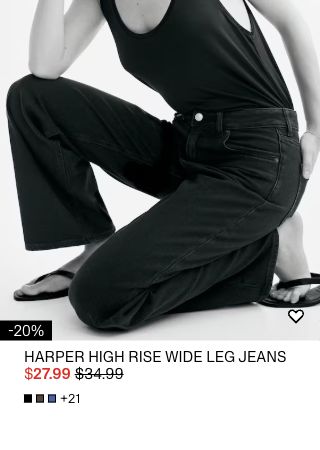
- The card links to productpage.1045459083.html.
- The visible name and price become the comparison fixture for the next step.
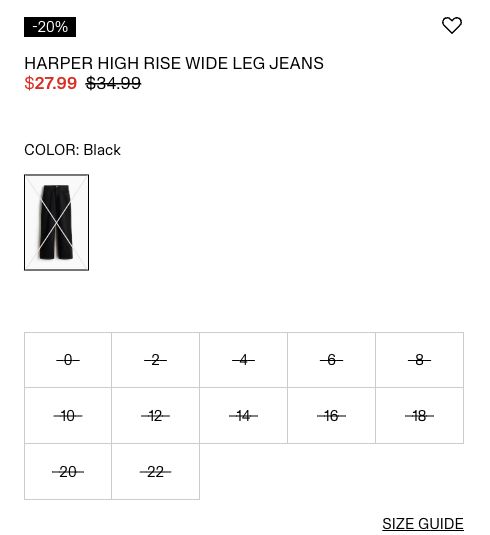
- We reached this PDP by clicking the card. Name, Black color and both displayed prices agree.
- The loaded accessible interface described Black and every displayed size as out of stock and offered Notify me. The crop shows the crossed-out sizes.
- This is an availability-policy investigation, not evidence that the entire category is unavailable.
Independent educational analysis of H&M’s public page. No client relationship or endorsement is implied.
Evidence limits. Historical US desktop observation. No store selected, notification submitted or purchase attempted. Inventory cause, duration and merchandising policy are unknown; no changes were made to H&M.
Electronics case: identity, connection and compatibility are separate checks
The Best Buy page identifies Sony WH-1000XM6, manufacturer model WH1000XM6/B, retailer SKU 6620467, Black, sold by Best Buy. Keep those fields separate. A manufacturer model is not a retailer SKU, and a review summary is not a specification source. When comparing another offer, also verify condition, seller, warranty and included accessories rather than matching the product name alone.
We opened See all specifications and captured its actual panel. It lists Connection Type as Wireless, Wired; Wireless Connectivity as Bluetooth; and True Wireless as No. These labels describe different properties. Turning them into a single claim such as “works wirelessly with everything” would discard the very distinctions a shopper needs.
The panel also displays a carrying case, over-ear fit, 30 hours of battery life and a three-hour charge time. These are retailer-displayed figures, not measurements by this course. Before comparing battery endurance, obtain the conditions behind each figure: enabled features, playback mode and the source’s stated test basis. If those conditions are missing, mark the comparison incomplete rather than declare a winner.
Compatibility needs a specific task. For a customer who needs both playback and microphone input on a particular laptop, record the laptop, connection mode, required function and manufacturer evidence. The visible Bluetooth label alone does not close that task. Request the appropriate documentation or a controlled test. A related accessory placement, sponsored recommendation or customer anecdote cannot substitute for the compatibility check.
Real store observation
Match the offer before interpreting its specifications
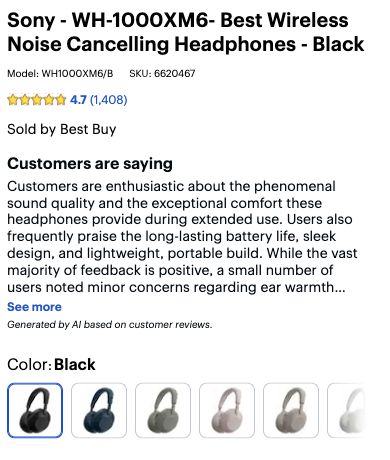
- Model and SKU are visible together.
- Black is the selected color.
- The seller is Best Buy; the AI review summary is not manufacturer specification evidence.
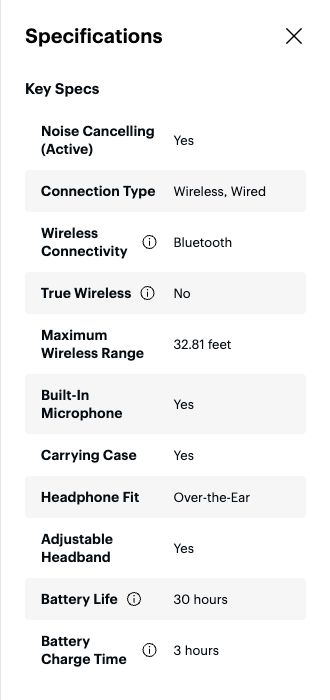
- Connection type and True Wireless describe different properties; they should not be collapsed into one ambiguous “wireless” claim.
- Units make a specification usable for comparison; preserve them when building a table.
- These are retailer-displayed specifications, not measurements performed by this course.
Independent educational analysis of Best Buy’s public page. No client relationship or endorsement is implied.
Evidence limits. The course did not test the headphones or verify manufacturer performance claims. Prices, ratings and delivery estimates are capture-time context, not current purchasing advice.
| Evidence | Useful statement | Still unresolved |
|---|---|---|
| Model WH1000XM6/B; SKU 6620467 | This observation refers to the Black retailer offer | Other sellers, colors and bundles need their own match |
| Wired / wireless; Bluetooth; True Wireless: No | Explain the connection modes separately | The customer’s exact device and required functions |
| 30-hour battery figure | Preserve the value, unit and source | Test conditions and fair comparison basis |
Build the fact register first
Record the exact SKU or variant, source, observation date, owner and limits for each claim. A supplier specification, a measurement, a customer observation and a marketer's inference are different evidence. Keep them distinct so a writer cannot turn an assumption into a specification.
The example below is fictional teaching material. Alder's Cedar 2 is a two-person tent, model A-CD2. The supplied product record lists 2.4 kg packed weight, 210 × 130 cm floor dimensions and a three-season designation. There is no verified wind rating or winter-use evidence. The sample price is £180; the green variant is temporarily unavailable and the sand variant is in stock.
| Fact / question | Supplied evidence | Writing decision |
|---|---|---|
| Packed weight | Product record A-CD2: 2.4 kg | State packed weight; do not call it the lightest |
| Two-person capacity | 210 × 130 cm floor | Give dimensions so shoppers can assess sleeping space |
| Storm protection | No verified wind-rating evidence | Do not promise storm-proof or four-season use |
| Included items | Tent, poles, pegs, carry bag | List inclusions; footprint sold separately |
| Variant stock | Sand in stock; green out of stock | Update each selected offer and buying control |
Before and after: make the decision easier
Before: “The ultimate lightweight tent for every adventure. Our premium design guarantees comfort in any weather.” These claims provide no decision evidence and exceed the supplied facts.
After: “Cedar 2 is a three-season tent for two people, with a 210 × 130 cm floor and a packed weight of 2.4 kg. Check those dimensions against your sleeping mats before choosing. The pack includes the tent, poles, pegs and carry bag; a footprint is sold separately. For winter camping or an exposed route, compare a tent with verified specifications for those conditions.”
The revised passage explains fit and limitations. It does not need a target word count. If a new measurement or test becomes available, add the source and update the passage rather than padding the description.
Annotate the page by customer question
The title identifies the product and a genuine distinguishing feature. The primary heading names the item plainly. Images show the exact product and useful details; alternative text describes the image's purpose without keyword repetition. Specifications provide comparable units. The buying area makes selected variant, price, availability, inclusions and delivery conditions clear.
Place care instructions, compatibility and genuine questions where they help a decision. Reviews retain their source and scope; never invent counts or ratings for markup. Related links distinguish an equivalent alternative from an accessory. A footprint is a complement, not a replacement tent.
| Page area | Example / task | Verification |
|---|---|---|
| Title | Cedar 2 two-person tent | Alder | Matches model and visible heading |
| Lead image | Sand Cedar 2, pitched, door open | Exact variant; useful scale/detail images follow |
| Buying controls | Sand · £180 · in stock | Same selection at add-to-cart and checkout |
| Specifications | 2.4 kg packed; 210 × 130 cm floor | Units and source preserved |
| Decision advice | Compare floor size with your mats | No unsupported performance claim |
| Offer data | Selected product/variant identity | Visible page, markup and feed agree |
Turn specifications into useful buying information
Choose three facts that could change the purchase decision and identify their sources. For a tent, packed weight, floor dimensions and what is included may matter more than a generic “premium quality” statement. Record the measurement conditions, unit and model variant. If two sources disagree, resolve the conflict before choosing the more attractive number.
Write one explanation connecting each fact to the decision without inventing an outcome. A floor dimension can help a shopper compare sleeping space; it does not prove comfort for every person. A specification table and a clear limitations paragraph often teach more than a long promotional description.
| Fact | Acceptable explanation | Unsupported leap |
|---|---|---|
| 2.4 kg packed weight | Compare against the weight you plan to carry | Effortless on every hike |
| 210 × 130 cm floor | Check against your sleeping mats | Comfortable for every pair |
| Poles and fly included | State exactly what is in the box | Everything you could ever need |
Run the variant matrix before signing off the PDP
Use a stable internal item ID where available, then record the exact URL that selects it. A URL parameter, a SKU and a platform variation ID are not interchangeable. Copy the store’s actual link rather than construct one from a fictional SKU. Keep the intended state next to the observed state so the reviewer can see the mismatch without reconstructing the test from screenshots.
Run direct entry in the intended customer session, change an option, reload, then return through browser history. Check name, image, selected attributes, price, currency, stock message and buying control together. Capture the final URL and timestamp for each state. If a copied link does not preserve selection, record that limitation explicitly; a correct result in the original session is not a direct-entry pass.
For images, inspect whether changing color selects the corresponding photograph and whether a detail view supports a real decision such as fastening, scale or included components. An image of the wrong variant is an identity problem; an accurate image without useful detail is a content gap. Test controls by keyboard and at narrow width, including visible focus and the availability announcement after a change.
| Fixture | Action | Record |
|---|---|---|
| Available combination | Direct entry, option change and reload | Exact identity, price and usable buying state |
| Unavailable combination | Open its link without the original session | Selection retained and intended stock policy explained |
| Different price or promotion | Switch both ways between offers | Correct amount, currency, conditions and image |
| Invalid or retired option | Open the obsolete link in your test environment | Honest recovery without silently substituting an unrelated item |
| Cart handoff in a controlled store | Add the allowed fixture; inspect the line item | SKU, selected attributes, quantity and price; no order required |
Check canonical, structured data and feed evidence independently
Write down the variant architecture before prescribing a canonical. Google distinguishes a single-page variant model from variants on multiple pages. Its single-page guidance uses one canonical for the group; its multi-page model has no single group canonical. Choose the approach that describes the site you actually maintain, then compare intended URLs with declared canonicals and internal links. A selected-color screenshot cannot establish that policy.
Inspect the structured data served for the exact URL and identify the product or group each entity describes. ProductGroup can describe shared properties and variant relationships; each offer still needs the correct identity and supported commercial details. Do not insist that every JSON-LD field change on every swatch click if the page correctly describes multiple variants. Check the architecture and entity scope instead of treating the default visible offer as the only permissible record.
Validate representative pages with Google’s Rich Results Test and keep the dated output. For a property you control, use URL Inspection to review Google’s fetched view. A syntactically valid result is distinct from an accurate offer, and neither guarantees a search appearance. For a technical indexability check, record response, robots access, indexing directives and canonical separately; a canonical observation alone is insufficient.
If you use Merchant Center, compare your source row, submitted item and processed item with the same selected PDP. Check identity, link, image, price, currency, condition and availability at recorded times. A local file checker can flag a malformed row, but it cannot certify account processing. Neither public retail case below includes access to private feeds or Google-selected canonicals; those cells remain untested.
Worked correction: zero inventory with the wrong backorder policy
Use a development store for this exercise. Our recorded WordPress Playground lab ran WordPress 7.1.2, WooCommerce 11.2.1 and Twenty Twenty-Five. The fictional Blue / Medium variation is AL-B-M, variation 13, USD 29, with tracked quantity zero. The exercise’s business rule is no backorders. Blue / Small is a control with five units at USD 29. These are practice records, unrelated to H&M or Best Buy.
Before the correction, Medium’s backorder setting was Allow and its selected storefront preview had an active Add to cart control. The defect is the conflict with the supplied no-backorder rule. Zero quantity alone does not establish a defect: another store may intentionally accept backorders. Confirm the policy before changing configuration.
We changed the affected variation to Do not allow, saved it and reopened the setting to confirm persistence. Quantity remained zero and price remained 29. Reopening the same direct-entry selection preserved Blue / Medium, reported Out of stock and showed an inactive buying control. Switching to Small showed five in stock and an active control. This is the completed before/after/control record from the lab, not a hypothetical outcome.
Real software · controlled practice lab
The same Blue / Medium before and after the policy correction
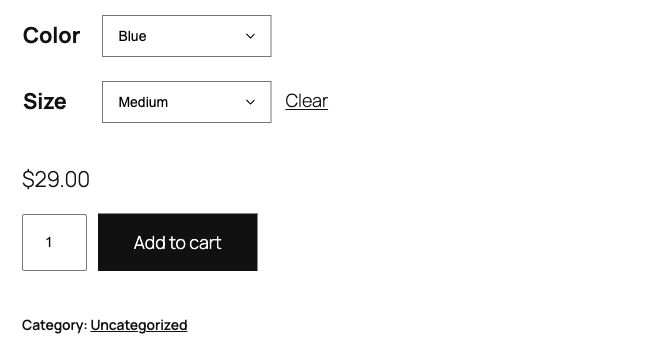
- The directly opened variant URL preserves Blue / Medium and shows 29 USD.
- This captures the interface state before the correction. No order was placed.
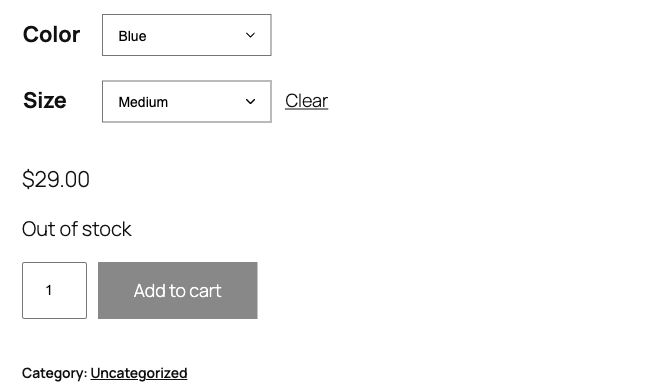
- Reopened the same direct-entry URL after saving. Blue / Medium stays selected.
- The page now reports Out of stock and the buying control is visually inactive.
Captured in our controlled practice environment using WordPress Playground. Products and inventory are fictional; the software interface is real.
Evidence limits. Captured on 2026-10-10 in a WordPress Playground browser lab, in the administrator’s storefront preview. The lab entered Coming soon mode during setup. Anonymous access, checkout enforcement, payments, cache behavior and Merchant Center synchronization were not tested. The separate 29/35 cache and Google mapping exercises remain hypothetical.
- Record the variation ID, stock management, quantity, price and intended order policy in your development store.
- Capture the selected storefront state before editing. Keep the original direct-entry URL.
- Change only the setting that conflicts with the supplied policy; save and reopen it.
- Reopen the same variation URL and compare identity, price, stock message and buying control.
- Test an unaffected available variation, then record the verification boundary rather than claiming all channels passed.
Close the lab ticket at the level actually verified
Ticket P03: the selected Medium preview permits the intended buying interaction despite the exercise’s no-backorder policy. Suggested owner: catalog operations; reviewer: storefront QA. Acceptance requires the saved policy, unchanged price and quantity, retained selection, unavailable message and an unaffected Small control. The screenshots below establish the configuration and control checks alongside the before/after storefront evidence.
These initial captures used an administrator session while the lab entered Coming soon mode. They did not establish anonymous access or server-side enforcement. The later anonymous-verification section in the related WooCommerce guide records the logged-out Medium state, Small cart check and server rejection of Medium, with a new capture. Keep payments and Merchant Center processing outside the completion claim; no production cache layer was available in the lab. Retain the initial workbook record and attach the dated follow-up rather than treating an inactive-looking button as server evidence.
If your retest fails, compare the same variation and serving context before changing another layer. Check inherited versus variation-specific settings, fulfillment context and stale output where relevant. Restore only a change that was actually wrong; do not undo the agreed stock policy merely to make the earlier screenshot reappear.
Real software · controlled practice lab
Confirm the saved setting and the unaffected Small control
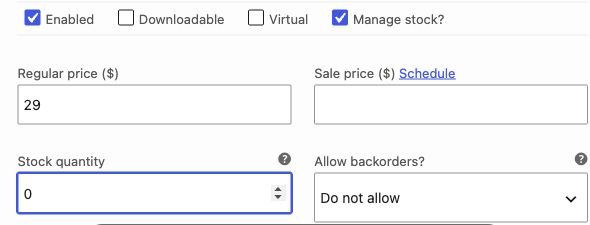
- Changed only the backorder setting and used Save changes.
- Reopened the variation after saving to confirm the setting persisted; the price and quantity are unchanged.
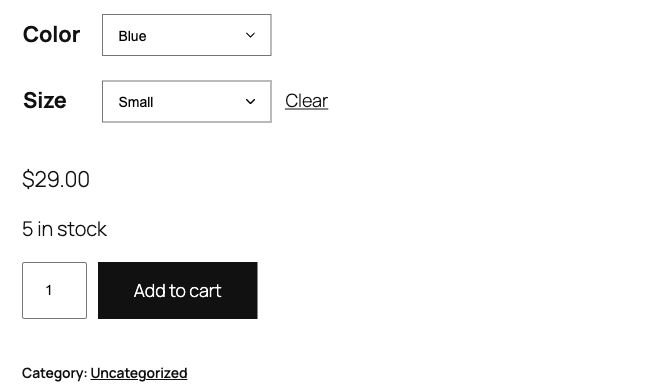
- Changed only Size to Small: the page reports 5 in stock at 29 USD.
- The control shows that correcting medium did not make every variation appear unavailable.
Captured in our controlled practice environment using WordPress Playground. Products and inventory are fictional; the software interface is real.
Evidence limits. Captured on 2026-10-10 in a WordPress Playground browser lab, in the administrator’s storefront preview. The lab entered Coming soon mode during setup. Anonymous access, checkout enforcement, payments, cache behavior and Merchant Center synchronization were not tested. The separate 29/35 cache and Google mapping exercises remain hypothetical.
Use the brief from draft to publication
Download the editable brief and copy the blank response fields for each product. It includes the completed Cedar 2 example and a source register. Assign owners for unresolved facts before drafting final claims.
- Identify the product, variants and primary customer decision.
- Record verified facts and prohibited unsupported claims.
- Draft the heading, short decision passage, specs and image shot list.
- Specify availability, delivery and compatibility requirements with owners.
- Review the rendered page and selected variants against the fact register.
- Schedule a review triggered by product, supplier, price or inventory changes.
Review the offer as well as the prose
Practice: your draft describes a blue item, the hero image shows red and the default selected variant costs more than the advertised offer. Worked answer: reconcile identity and landing state before polishing the text. The correct copy cannot compensate for an incorrect selected item.
Pass when a reviewer can trace factual claims to sources and reproduce the promised offer from an external landing link. Check mobile selection, unavailable options, image alternatives, structured data and feed consistency separately. Keep the brief with its evidence so the next product update does not reintroduce old claims.
Deliver the audit as evidence, decisions and a release check
Prioritize a confirmed wrong product, misleading offer or blocked purchase path before cosmetic copy improvements. Keep impact separate from confidence: an ambiguous stock message needs investigation even if the affected product matters commercially. Use your store’s demand and revenue context rather than assign invented severity scores to a public screenshot.
Each task needs the affected item or template, evidence reference, owning role, proposed change, acceptance fixture and actual retest. The workbook includes the completed lab decision and a blank area for your own backlog. Close only the verified scope. Preserve release and recovery references so a later inventory or theme change can be investigated against the same fixtures.
Repeat the checks after changes to specifications, product options, pricing rules, stock policy, theme or feed mapping. Use the category kit to verify the entry promise, the variant playbook to investigate URL selection, and the platform guide for the owning settings. Passing an implementation check establishes behavior; traffic and commercial impact require a separate measurement record.
Sources and maintenance
Check current platform documentation before implementation. Review these instructions when your platform, catalog behavior or source guidance changes.