Audit kit + worked case + Excel · Free to use
Category SEO audit kit: from listing to product
Audit a complete shopping journey, separate observed facts from assumptions, and turn the findings into owned tasks with measurable acceptance criteria.
Practice datasets are fictional and labeled as such. Real store captures are dated observations with their own sources and evidence limits.
1. Define the shopping task and the audit boundary
Start with a customer decision, not a word-count target. Our worked task is to browse women’s black jeans in the US, compare a wide-leg option and reach its exact product page. We inspect one public H&M journey on 10 October 2026. This is independent educational analysis, not client work or a complete technical audit of H&M.
Download the workbook and start in Your audit. Give every finding an ID, an affected URL or template, dated evidence and a clear boundary. Use the Worked case to compare your reasoning, then use the Acceptance sheet to write the implementation handoff. The role names in the worked example are suggested responsibilities; they are not assignments to H&M staff.
For your store, sample the main category, a useful narrower destination, a filter combination, a later results page and a linked PDP. Add a sparse or empty range and a mobile journey. This gives you different failure modes without pretending a small sample represents every category. Preserve market, currency, device, consent state and whether you navigated through the UI or opened a URL directly.
| Evidence available in this case | Evidence still needed for a full audit |
|---|---|
| Public headings, product card, PDP, rendered links and one canonical observation | HTTP responses and headers, crawl inventory, robots rules and consistent template sampling |
| A failed page-two interaction in this browser session | Reproduction across fresh sessions and direct entry; cause and affected scope |
| Displayed price and selected Black product state | Catalog availability policy, inventory freshness, Search Console and commercial outcomes |
2. Check that the category earns its promise
The filtered destination says Women’s Black Jeans and displays 60 Products with one active filter. Fit routes include Wide-Leg Jeans, Straight leg and Skinny. This tells us how the interface presents the range; it does not establish search demand, the total number of purchasable sizes or an indexation result. The URL was opened directly from the previously observed category link. We do not claim that applying the filter in the panel succeeded.
Write an inclusion rule before rewriting copy: which product type, customer, color, fit and stock states belong here? Check the entire exported membership when you have access. On the public page, record only the sampled cards. A product can satisfy the color rule while failing a customer’s availability requirement; those are different findings with different owners.
For your own site, compare the promise in the title, H1, breadcrumb, introduction and grid. Useful category copy resolves a decision: fit differences, sizing, compatibility or material constraints. If the grid mixes unrelated items, more introductory text will not repair membership. If the range is coherent but shoppers cannot distinguish its products, improve comparison information rather than add generic prose.
Real store observation
The category’s promise: Black jeans
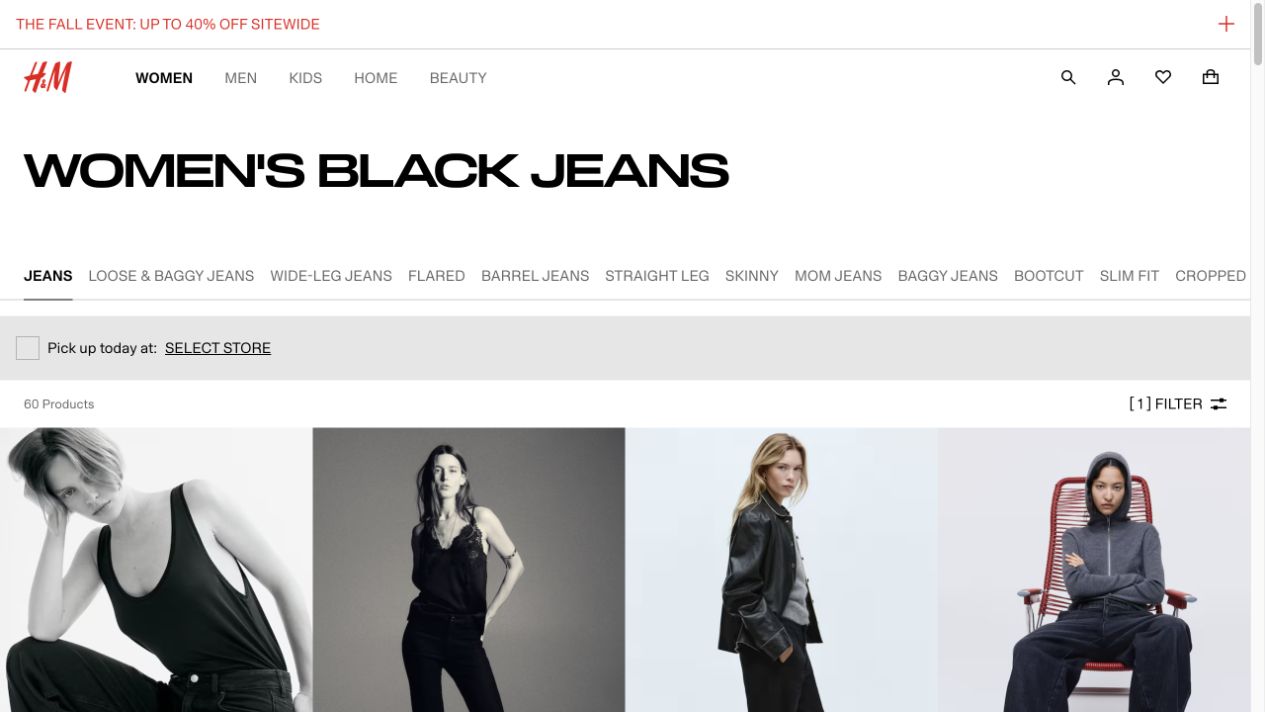
- The heading, 60 Products count and one-filter state describe this captured destination.
- Fit routes are visible above the grid. Their presence does not establish how a selected color is preserved.
Independent educational analysis of H&M’s public page. No client relationship or endorsement is implied.
Evidence limits. Directly opened the previously observed filtered URL. Filter-panel success, complete assortment coverage and Google indexation were not established.
- Record the intended shopping task and the exact destination that owns it.
- Check a matching item, a borderline item and an excluded fixture against the membership rule.
- Compare visible counts with what they actually count: products, variants or results. Do not label a product count as available inventory.
- Record missing evidence as Investigate. Mark a check Verified only for its stated sample and condition.
3. Follow a real card to the exact PDP
We clicked Harper High Rise Wide Leg Jeans in the filtered listing. Its link led to productpage.1045459083.html. The card showed a sale price of $27.99 and a crossed-out $34.99. The PDP retained the product name, Black color and those prices. This verifies identity and visible price continuity for this one transition.
After the PDP finished loading, Black and all displayed sizes were marked out of stock in the accessible interface; the purchase area offered Notify me. The screenshot shows the crossed-out sizes. We did not select a pickup store, request a notification, add to a bag or place an order. The category card’s presence therefore cannot be treated as proof that this color is immediately purchasable online.
This creates a policy question, not an automatic deletion recommendation. A retailer may intentionally retain temporarily unavailable products. For your store, decide whether a category includes them, how they are ordered, and how availability is communicated before the click. Validate against current inventory and merchandising policy before assigning a defect. One observed product does not justify removing an entire product family or noindexing a category.
Real store observation
From a category card to the exact Black product

- The card links to productpage.1045459083.html.
- The visible name and price become the comparison fixture for the next step.
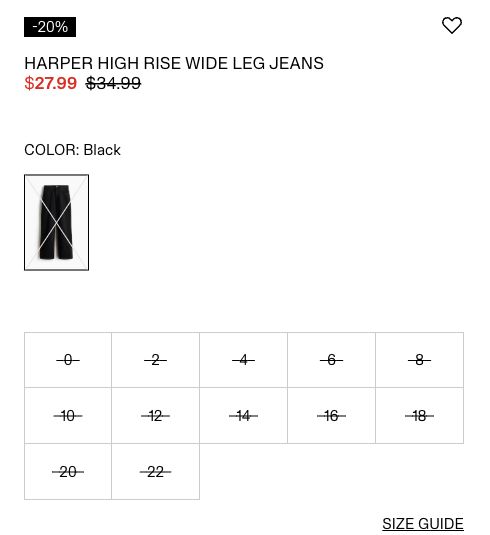
- We reached this PDP by clicking the card. Name, Black color and both displayed prices agree.
- The loaded accessible interface described Black and every displayed size as out of stock and offered Notify me. The crop shows the crossed-out sizes.
- This is an availability-policy investigation, not evidence that the entire category is unavailable.
Independent educational analysis of H&M’s public page. No client relationship or endorsement is implied.
Evidence limits. Historical US desktop observation. No store selected, notification submitted or purchase attempted. Inventory cause, duration and merchandising policy are unknown; no changes were made to H&M.
| Check | Observed result | Next decision |
|---|---|---|
| Product and color | Harper / Black reached through its card URL | Keep this as a regression fixture |
| Visible prices | $27.99 sale / $34.99 original on both surfaces | Verify other price states separately |
| Availability | PDP marks the displayed Black sizes out of stock | Investigate inclusion and disclosure policy |
| Commercial outcome | No order or conversion measurement | Do not claim lost revenue or improved conversion |
4. Audit the routes around the grid
A useful category is part of a route: department to category, category to relevant refinements, grid to product and product back to a meaningful parent. Record each source, anchor and destination. Our observed listing exposed actual product links, and the PDP breadcrumb linked to Women, Jeans and Wide-Leg Jeans. That is evidence of available routes in the rendered document, not proof that every product is discoverable by a crawler.
On your store, check that important products have ordinary links with useful href destinations and that the category itself is reachable from appropriate navigation. Compare crawl results with the catalog and sitemap to find items missing from the linked inventory. Search-only discovery should prompt investigation. Do not substitute a screenshot of a working search box for a discovery test.
Inspect refinements individually. A Wide-Leg link may lead to a fit category that drops a previously selected color. Record the actual resulting state before calling it a bug: the interface may intend a sibling route. If your expected behavior is to preserve Black, write that expectation into the ticket and test both entry and return navigation. We did not test color preservation on the H&M fit links in this case.
5. Separate filter utility from search eligibility
The observed Black destination contains colorWithNames and type query parameters. A read-only check of the rendered document found a canonical pointing to that same filtered URL. No generic robots meta element was found in that DOM check. This is narrower than saying the URL is indexable: response headers, crawler-specific directives, robots access and Google’s selected canonical were not established.
For your own site, maintain a small approved set of search destinations with a distinct shopping purpose, reliable assortment and useful internal links. Other combinations can remain shopping controls without becoming targets for organic landing pages. Record the intended policy first, then check the response, crawler access, indexing directives, canonical and discovery signals against it. A query-string URL is not inherently low quality, and a clean path is not evidence of a useful category.
Canonicalization, noindex and robots blocking solve different problems. A canonical is a consolidation signal; it is not a guaranteed removal instruction. A crawler must be able to access a page to read a new noindex directive. Avoid deploying a blanket parameter rule from one screenshot: it could also cover valuable destinations or prevent a corrective directive from being read.
| Candidate | Decision to record before implementation |
|---|---|
| Stable category for a distinct shopping task | Which URL owns the task, with what inclusion rule and supporting evidence? |
| Alternative sort order | How will duplicate result ordering be handled without losing product discovery? |
| Narrow or temporary filter combination | Is there a lasting purpose and enough suitable inventory to maintain it? |
| Impossible combination | What response and recovery experience should this state provide? |
6. Test later results instead of assuming they work
The filtered H&M page exposed an ordinary Go to page 2 link whose href retained the two filter parameters and added page=2. Clicking it reached that URL but produced an application error in this browser session. We recorded the failed interaction. We did not establish its cause, persistence, behavior for Googlebot or whether direct entry would succeed. The workbook therefore keeps this as an investigation, not a confirmed sitewide outage.
For your own audit, open the linked next-page URL directly as well as through the interface. Confirm that it presents the expected distinct products and that links onward remain available. Test the first, middle, last and out-of-range pages. Keep filter and sort state intentional. A Load more button working for a person is not itself proof of crawlable product discovery.
Google recommends unique URLs and sequential links for paginated collections, with each page using its own canonical rather than canonicalizing all pages to page one. Use those checks for the actual implementation. Compare discovered product IDs with the source range to detect missing items or repeated batches; record duplicates before assuming a changing sort order is a pagination defect.
- Save the source URL, exact control, destination and observed failure or success.
- Repeat in a fresh session and compare click navigation with direct entry.
- Check response and rendered product links; document technical and session differences.
- Only expand the affected scope after testing other pages and templates.
7. Repeat the customer task on mobile
Re-run the journey at a narrow viewport. Read the category promise, open and close the filter, apply and remove a selection, inspect a card, reach the PDP and return. Check that selected state remains understandable, controls have usable hit areas and sticky elements do not hide important actions. Record the device and viewport; a desktop capture resized into a narrow article is not a mobile test.
Our new category-to-PDP case was captured at desktop width. The separate H&M category example includes an earlier mobile observation, but it does not certify this whole journey on a phone. In your workbook, leave the mobile acceptance row open until you have repeated the actual task. This prevents a visually persuasive desktop example from becoming an unsupported mobile pass.
8. Turn evidence into a bounded implementation task
Start with confirmed blockers on important customer or discovery paths. Next address mismatched promises and avoidable dead ends. Put speculative enhancements behind those. Keep severity separate from confidence: an error with potentially broad impact still needs reproduction before you call its scope confirmed. Use traffic, inventory and business context from your own store to order the backlog; this case supplies none of those private inputs.
Worked task C03 investigates the category’s unavailable Black product. The proposed owner is merchandising, supported by catalog engineering. The next check is to compare the exact item with the inventory source and the agreed inclusion policy. If unavailable products should remain visible, possible acceptance is an accurate unavailable label and an intentional position in the grid. If they should be excluded, acceptance is that this fixture is absent while matching available fixtures remain. Choose the policy before implementing either outcome.
Worked task C05 investigates page two. Suggested owner: storefront engineering. Acceptance requires click and direct-entry paths to display the expected later product set, preserve the intended filter state and expose onward links. Save the environment, release identifier and before/after evidence. We have not made or verified either change on H&M.
| Weak ticket | Reviewable ticket |
|---|---|
| Improve category SEO | C03: establish the Black-item availability policy, then test the chosen rule against available and unavailable fixtures |
| Fix pagination everywhere | C05: reproduce the observed page-two error, establish affected scope, then verify click and direct-entry behavior |
| Add 500 words | Identify the unanswered fit decision, obtain product facts and add the smallest useful comparison |
9. Close the audit with evidence, not a completion label
The deliverable is a decision register and an acceptance record. Every implemented row needs the affected URL or template, evidence ID, owner, release or change date, expected result and actual retest. Keep observed passes, open investigations and proposed changes distinct. A verified price transition can coexist with an unresolved availability policy in the same journey.
Before release, test matching, excluded, unavailable, empty and later-page fixtures. Check desktop and mobile. After release, repeat the same paths and watch your own crawl and search evidence for the affected URLs. Compare like periods and annotate stock, promotions and tracking changes before interpreting traffic. Passing the acceptance test confirms implemented behavior; it does not guarantee rankings or establish causal revenue growth.
Use the category-page playbook for the broader brief and membership exercise, and the faceted-navigation planner when a finding needs a URL policy decision. Keep this kit as the repeatable audit procedure: one customer task, traceable evidence and a backlog another person can actually verify.
Sources and maintenance
Check current platform documentation before implementation. Review these instructions when your platform, catalog behavior or source guidance changes.